

TimeLine Pro
3ds Max Plugin — Native C++ Performance
Animation workflow,
redesigned from scratch.
TimelinePro replaces 3ds Max’s default track view with a real-time, non-destructive animation system built for production pipelines.
Get TimelinePro →GLB/FBX
Game-engine export formats
Mixer
Motion Mixer integration
Clips
Non-destructive clip library
FX
Procedural expression controllers

TimelinePro — Track List Panel Overview

Motion Mixer — Trim, Loop, Blend

Curve Editor — Real-Time Tangent Handles

Animation Layers — Per-Layer Keyframe Display
Core Features
Everything your animation
pipeline needs.
Built as a native C++ plugin — not a script wrapper — so it runs at the speed of Max itself.
Real-Time Value Scrubbing
Drag any Position / Rotation / Scale field and the viewport updates instantly — every pixel, no 120ms debounce lag. Same responsiveness as Max’s own Move gizmo.
Non-Destructive Clip System
Wrap any animation range into a named clip. Trim, loop, reorder, split, and blend clips without touching the original keyframes. Full undo support.
Full Rig Hierarchy Support
Add a root bone and the entire skeleton expands in the track list — every bone, sub-anim, and controller accessible in one panel.
Procedural FX (Expression Controllers)
Click fx on any float controller row — type a MAXScript expression like sin(F*0.1)*50 and watch it apply live. Remove by clearing the field.
GLB Export — Game-Engine Ready
Export skinned characters with correct skeleton orientation (Y-up), inverse bind matrices, and full animation curves. Tested in Unity, Unreal, Godot, and Blender.
GLB Import
Import GLB with skeleton reconstruction, skinned mesh, animation retargeting, and Physical Material assignment. Vertex welding prevents mesh holes at UV seams.
FBX Export via Built-in Exporter
One right-click → “Export as .FBX” — uses Max’s own FBXEXP, so you always get the same result as File → Export, without leaving the timeline panel.
Motion Mixer Integration
View and manage Motion Mixer tracks and clips in the same timeline panel. Blend weights, loop counts, and fade in/out — all in one place.
Animation Layers
Full animation layer panel with per-layer keyframe display, blend mode assignment, and live sync with Max’s native layer system.
Curve Editor
Built-in bezier curve editor with real-time tangent handles, key dragging, easing presets (linear, ease-in, ease-out, ease-in-out), and smart ticking ruler.
Assign Controller
Right-click any Position, Rotation, Scale, or Float controller row to assign a new controller type — all standard Max controllers available from the menu.
Material & Texture Export
GLB export includes Physical Material parameters and embedded textures. Choose JPEG or PNG encoding. Multi/Sub-Object materials fully supported.
Comparison
TimelinePro vs. default Track View
What you gain by switching.
| Feature | 3ds Max Track View | TimelinePro |
|---|---|---|
| Real-time scrub on value fields | ✕ | ✓ |
| Non-destructive clip system | ✕ | ✓ |
| GLB export (game-engine ready) | ✕ | ✓ |
| GLB import with skinning | ✕ | ✓ |
| FBX one-click from timeline | ✕ | ✓ |
| Procedural expression per-track | Limited | ✓ Inline FX editor |
| Rig hierarchy in track list | ✕ | ✓ |
| Controller assignment from UI | Motion Panel only | ✓ Right-click menu |
| Animation layer panel | Separate panel | ✓ Integrated |
| Easing presets (linear, ease-in-out…) | ✕ | ✓ |
| License | Built-in (subscription) | One-time purchase |
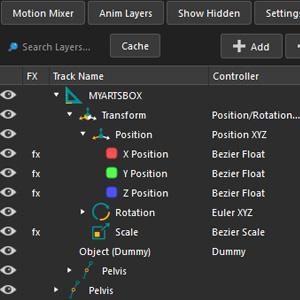
Custom Icon for Layers
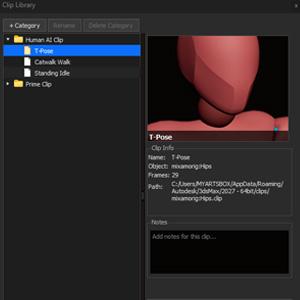
Clip System
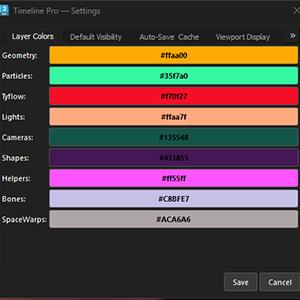
Manage Layers Color
Compatibility
Supports every current
version of 3ds Max.
One purchase — all three builds included.
3ds Max 2025
3ds Max 2026
3ds Max 2027
Export targets
Unity
Unreal Engine
Godot
Blender
Any GLB viewer
Technical Specs
Built for production.
No Python, no MAXScript interpreter overhead — pure compiled C++.
Plugin type
Native C++ .dlu
UI Framework
Qt 6.5 (via MaxQtBridge)
GLB Library
tinygltf (header-only)
Texture encode
WIC — JPEG / PNG
Skin import
ISkinImportData API
Material
Physical Material + StdMat2
Controller API
IKeyControl / IParamBlock2
Install
Copy .dlu → plugins folder
Extra runtime
None — uses Max’s own Qt
License (Qt)
LGPL v3 — no royalties
Pricing
Simple, one-time pricing.
No subscription. No seat limits. Buy once, use forever.
Indie
$99
one-time · 1 seat
- All 3 Max versions
- GLB + FBX export
- GLB import
- 1 year of updates included
- Email support
Updates after year 1: $30 / year (optional)
Buy Indie
Most Popular
Studio
$420
one-time · up to 5 seats
- Everything in Indie
- 1 year of updates included
- Priority support
- Commercial use
- Team license (5 seats)
Updates after year 1: $30 / seat / year (optional)
Buy Studio
Enterprise
Custom
unlimited seats · SLA
- Everything in Studio
- Floating license
- Custom integrations
- Dedicated support
- NDA available
Update plan included in contract
Contact Us
FAQ
Common questions.
Does it replace the default Track View?
TimelinePro adds its own dockable panel — it does not remove or break the default Track View. You can use both side-by-side.
Do I need to install Qt separately?
No. TimelinePro uses the Qt runtime already bundled with 3ds Max via MaxQtBridge. No extra DLLs needed — just copy the .dlu file.
Which game engines can I import the GLB into?
Unity, Unreal Engine, Godot, and Blender have all been tested. The output is standard glTF 2.0 with Y-up orientation and correct inverse bind matrices.
What happens when a new Max version is released?
All updates during your first year are included at no extra cost. After year 1, your license never expires — the version you have keeps working forever. If you want to stay current with new 3ds Max versions and new features, you can renew for $30/seat/year (optional). No renewal = no problem, you just stay on the version you have.
Is there a refund policy?
Yes — 7-day no-questions-asked refund. If TimelinePro doesn’t work for your workflow, just request a refund within 7 days of purchase.
Free Community Version
Want to try before buying? A free, limited version of TimelinePro is available on GitHub — open-source with basic timeline features. No payment required.